How Safaricom and Pesapal Introduced Dynamic QR Codes: What Scan-to-Pay Is and How It Works.
Safaricom and Pesapal’s Dynamic Scan-to-Pay lets M-PESA customers pay by scanning a QR code that automatically fills in merchant details and the bill amount. Here’s how it works, what makes it different from static QR payments, and what it means for shoppers and merchants.

Scan-to-pay at a Supermarket
Back in August 2019, the Nigerian fintech founder Adedeji Olowe declared QR payments in Africa "dead on arrival". He had watched local payment startups try to copy China’s checkout revolution while ignoring the messy reality of African retail. Printing a black-and-white square on a piece of card costs almost nothing. Getting millions of shoppers and cashiers to change how they pay is a different fight altogether.
Handsets were expensive, mobile data dropped inside concrete supermarkets, and banking apps took forever to load. Nobody standing at a busy till with five impatient shoppers breathing down their neck wants to stand there fighting a phone camera. Worse still, early providers tried to trap users inside closed-loop wallets. Shoppers had nowhere to spend the balance, and shopkeepers saw no reason to train their staff for a handful of users.
Ọlọ́wẹ̀ left the door open for one possibility: the underlying plumbing could eventually catch up. Seven years on, Safaricom and Pesapal have introduced a unified QR checkout system by grafting the technology directly onto the one payment rail Kenyan shoppers already use daily. M-PESA still moves the money. The phone camera cuts down the typing.
What Scan-to-Pay is.
When you pay via a traditional Lipa na M-PESA Buy Goods till, you crane your neck to read a faded six-digit Till Number taped to the counter, punch it into your phone, key in the shilling amount, squint at the confirmation prompt, and enter your PIN while the cashier waits for the SMS chime.
Every single purchase forces the customer to act as a human data-entry clerk. The shop already knows its own Till Number, and the electronic register already knows the bill total, yet your thumbs have to bridge the gap between the two machines. We only tolerate the ritual because muscle memory makes it feel fast.
Static Scan-to-Pay was Safaricom PLC’s first step in trimming that chore. It embeds the merchant’s Till Number inside a printed QR sticker placed at the counter. When you scan the card, the phone reads the merchant’s identity automatically, leaving you to type in the shilling amount and your PIN.
On 1 October 2026, Safaricom and Pesapal introduced Dynamic Scan-to-Pay. Instead of pointing your phone at a printed sticker on the counter, you scan a live QR code generated directly on the screen of the cashier’s Pesapal point-of-sale (POS) terminal for that exact shopping basket. Both the merchant’s details and the exact shilling figure pop straight onto your phone screen.
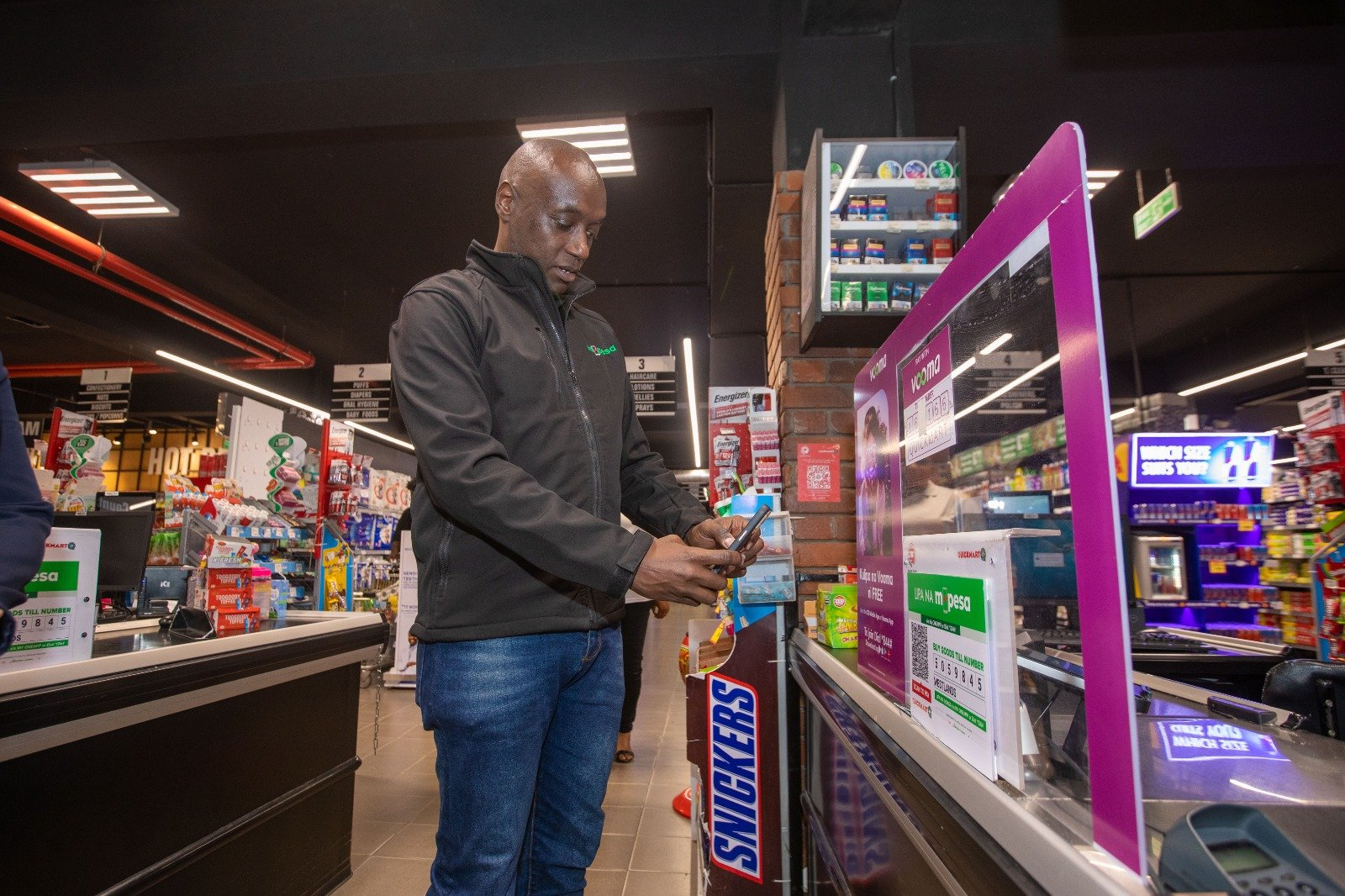
Take a KSh2,450 grocery run. A static printed sticker saves you typing the six-digit Till Number, though you still have to key in KSh2,450 yourself. Pesapal’s dynamic terminal screen loads the merchant name and the KSh2,450 bill in one go. Your job shrinks from copying numbers to checking them. That shift reduces typing mistakes, such as entering the wrong Till Number or adding an extra zero, while keeping final PIN authorisation in your hands. Scanning does not make every QR code trustworthy: always verify the merchant and amount before entering your PIN. The app also shows merchant details when you enter a Till Number manually, so that check is not a benefit unique to scanning.
From Toyota assembly lines to Kenyan checkouts
That division of labour goes right back to the QR code’s factory roots in 1994. Masahiro Hara and his engineering team at Denso Wave in Japan needed a faster way to track car parts moving down automotive assembly lines. Traditional barcodes held too little data and had to be lined up at a precise angle, so Hara’s team built a two-dimensional square anchored by three bold corner boxes that a scanner could lock onto at high speed.
A QR square is still just a passive container for text. Everything that matters happens in the system wired behind the glass. Point your camera at a table tent in a Westlands café and it opens a PDF dinner menu. Point it at a Pesapal terminal and it passes a merchant ID and a transaction figure to Safaricom’s payment servers.
The square itself cannot fix a dead network mast, settle an interbank ledger, or tell a flustered attendant why a receipt failed to print. Those headaches belong to the networks and the people running the shop. That was the core of Ọlọ́wẹ̀’s 2019 warning: a clever square cannot rescue a clunky checkout.
How Safaricom and Pesapal wired the rollout
Safaricom brings the M-PESA wallet and the customer habit. Pesapal brings the countertop POS terminals already sitting in thousands of restaurants, pharmacies, petrol stations, and supermarkets across Kenya. Connecting Pesapal’s checkout hardware to Safaricom’s payment app means an M-PESA customer never has to download a separate QR wallet or pre-load a new balance just to scan at the till.
At launch, the two partners pointed to a footprint of more than 60,000 merchant outlets accepting Scan-to-Pay, alongside a target of 500,000 outlets within twelve months. Those 60,000 outlets cover the wider M-PESA Scan-to-Pay footprint rather than proving that all 60,000 locations already run Pesapal’s dynamic terminal software.
Scale on a press release is easy. Habit at the counter is hard. If a QR standee is buried behind boxes of chewing gum, if the attendant does not know which button brings up the code on the PDQ machine, or if the app lags for eight seconds on weak indoor data, the shopper will open the SIM Toolkit and type the Till Number by hand.
Kenya’s regulatory plumbing has also matured since 2019. In May 2023, the Central Bank of Kenya issued the Kenya Quick Response Code Standard to bring regulated banks and payment service providers onto a common technical specification. Shared rules stop twenty providers from cluttering a shop counter with twenty incompatible plastic placards, though customers still have to use a payment app supported by the merchant’s terminal.
Cashiers need to know how to trigger the dynamic code without fumbling, and shoppers need one clean, smooth checkout to see why scanning beats typing.
How to use Scan-to-Pay at the counter
Spot the payment code: At a participating checkout, ask the cashier for Dynamic Scan-to-Pay on the Pesapal terminal, or look for the printed M-PESA QR plaque if the shop uses a static setup. Make sure you are scanning the payment code rather than a sticker meant for a digital menu or promotion.
Open the scanner: Open Safaricom’s official My OneApp (which houses both M-PESA and the Scan-to-Pay scanner), tap the QR scanning icon, and grant camera permission if prompted. Point your camera at the Pesapal screen or counter plaque.
Check the details: Once the payment screen populates, verify the merchant name. On a static code, enter the agreed bill amount. On a dynamic Pesapal terminal, the exact amount will already be filled in-just compare that figure against your receipt.
Authorise with your PIN: Follow the prompts and enter your M-PESA PIN inside the app to approve the payment. Keep your PIN private; a cashier never needs to see or hear it.
Confirm receipt: Wait for the confirmation message and let the attendant verify that the payment has landed. If the network hangs, check your transaction status before scanning a second time so you do not pay twice.
This flow requires a camera-equipped smartphone and a connection, but not necessarily paid data bundles. My OneApp is zero-rated on Safaricom, so using the app does not consume your data bundles, although mobile data must be switched on to connect; Wi-Fi can also be used after sign-in. Downloading or updating the app may use data. Any well-run checkout will still keep the standard Till Number and SIM Toolkit or USSD option available for shoppers using basic kabambe feature phones or unable to connect.
What this solves behind the counter
For a busy merchant, reducing manual number entry can cut down the time spent reversing misdirected payments or chasing shoppers who accidentally underpaid by twenty shillings. Whether that promise delivers shorter queues on a busy Friday afternoon depends on terminal speed and staff familiarity.
Matching thousands of standalone M-PESA messages against individual cash-register sales is a daily bookkeepingheadache for Kenyan retailers. Because Pesapal’s dynamic QR code is generated for a specific basket on the POS machine, tying the payment reference directly to the sale takes the manual labour out of matching receipts to purchases; provided the merchant’s checkout software, payment confirmation, and accounting records are properly integrated.
A QR code cannot replace clear exception-handling when a transaction fails or a customer needs a refund. Yet the same transaction-specific scan could eventually simplify payments far beyond supermarket lanes, from service invoices and hospital bills to rider deliveries and bookings.
Safaricom and Pesapal will judge this rollout by three hard numbers: completed scans, repeat customers, and how rarely a cashier or shopper has to abandon a scan and type the Till Number instead. Ọlọ́wẹ̀’s impatient shopper from 2019 is still the person at the till. Next time you reach a participating counter, point your camera at the terminal, check the merchant and the figure, and let the phone do the copying.
The Precursor Editorial Team
Precursor is published by the FinTech Association of Kenya and exercises independent editorial judgement under the Editorial Independence Charter. This article is labelled Partner Content, which marks commercial material. Written by a commercial partner. Not edited by Precursor.
Why Africa’s cash mirage needs vertical software rather than more roadside agents.
Physical cash still dominates African commerce because mobile money built a continent of human ATMs instead of digitizing industry workflows.
Payments · 15 min read
PesaLink’s New ID Makes Bank Transfers Easier. The Bigger Question Is Who Owns the Rail
PesaLink’s portable payment ID could let Kenyans send money using phone numbers or other familiar identifiers without knowing the recipient’s bank, while lower transfer fees seek to make the rail easier to use. Its rollout also lands as Kenya debates a national instant-payment switch, raising a bigger question over whether PesaLink can evolve from bank infrastructure into part of a broader payments system, and under whose rules.
Payments · 7 min read
SHOW! Safaricom Has Fixed One Kenyan Absurdity. Unfortunately, We Have a List.
Kenya built one of the world’s most sophisticated mobile-money systems, then somehow decided the best way to prove a digital payment was to hand a stranger your phone and let them inspect the evidence. Safaricom’s Jumbe finally makes that ritual less invasive. We applaud them. This was probably a mistake, because now that we know they can remove absurdities from everyday payments, wananchi have several more assignments.
Payments · 17 min read